The new way to power play
Migrating to our new app Powershop Lab? Download the new app or log in on your browser to get started.
What is Powershop Lab?
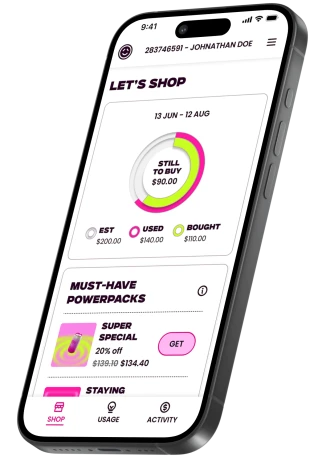
Powershop Lab is our brand-new app. We’ve called it this on purpose, because we’re building it in real-time based on your feedback. Instead of making you wait, we're actively deploying fixes, improvements and new features as we code them.
Think of this page as your go to place to see what's new, what's changing and what we're working on.
We know the new app isn't right yet, and we need your help to get there. Hit up our survey to let us know what’s working, what's not and what you want to see next. Thanks for bearing with us.

Latest features
You spoke, we listened. Based on your feedback, here are the latest features and improvements we’ve just launched to make managing your power even easier.
Latest features
-

Powerpack Pantry
View what Powerpacks you've got, what's available now, and what's available in the future - all in one place! Find under 'Activity'.
-
Properties tab
Got more than one property? The Properties page is your one stop shop to find out what properties you have signed up to Powershop, and any closed accounts. It's also a really good place to find the account numbers and ICP's for your properties.
On the workbench
We’re far from finished! Here’s a look at the fixes, updates and what we're working on next.
Last updated: 29 May 2026
Latest updates
|
What's improved |
Why it matters |
|
Estimates |
We’ve improved how estimates are calculated, so short cold snaps or one‑off high‑usage days won’t cause as many spikes. This should give you clearer, steadier estimates. |
|
Usability |
We’ve made behind‑the‑scenes performance improvements, including updates to increase app stability and fixing bugs affecting Powerpack visibility. |
|
Shop 101 info |
Trying to make sense of the numbers? Whether you're decoding the Power Organiser, figuring out estimated usage, or untangling standard rates from special rates, we’ve got you covered. Shop 101 now sits in the app to clear up the mystery, just click the ℹ️ icon under ‘Shop’ to take a look. |
What we're working on
|
What you'll be able to do |
What this means for you |
|
Multi-pack purchasing |
Looking to stock up on Powerpacks? Grab the deals you want in one go. ETA June. |
|
Pay your bill in the app |
Didn’t quite cover the month with Powerpacks? No worries, you’ll be able to settle up quickly in the app. |
|
Shift your payment date |
Make your power work around you. Choose a payment date that suits your schedule. |
|
See exactly what you owe, at a glance |
No more guesswork. We’re making it clearer how much is left to pay. |
|
Manage refunds in the app |
Changed your mind on a Powerpack? No stress, sort refunds quickly in the app without needing to call us. |
|
Move house in the app |
Moving house? Get your new property set up in the app, whenever it suits you. |
We're building the app as we go based on your feedback. This means things might get pushed out a little, but we'll keep this page up to date so you're always in the loop.
FAQs
As we transition customers onto the new system, there’s a few things to be aware of to make sure you hit the ground running.
Can I use the old app?
Can I use the old app?
Nope - The new app is here to stay and it’s built to be better, faster, and future-proof. Now that your account's settled into its new home, the old app and online portal won't be working anymore. All the good stuff is in the new place!
What's happened to my password?
What's happened to my password?
Passwords are out, login links are in. It’s a safer, faster way to sign in.
Why do I have to enter my payment details again?
Why do I have to enter my payment details again?
If you currently pay by credit or debit card you'll need to re-enter your card details on your account. For security, your payment details have not been transferred and cannot be updated over the phone - so you’ll need to re-enter them in the app before you can make a payment.
Do I need to update Powershop's details in my internet banking?
Do I need to update Powershop's details in my internet banking?
Yes! Your account number will now start with "A-".
If you pay by internet banking, when you get a chance, update your payment reference to your new account number. This will mean we can match your payments much faster. But no stress if you don't – we'll still match up your payments, it may just take a few extra days to work our magic.
Why are there already charges on the new app?
Why are there already charges on the new app?
Anything outstanding on your account in the old app will be carried into the new one. It’s just part of your usual usage, nothing extra has been added.
Have my rates changed?
Have my rates changed?
Nope - your rates are the same!
Where's your old email address gone?
Where's your old email address gone?
For all your service bits and bobs – like bills and account updates – we've got a shiny new email address: hello@team.powershop.co.nz. Do us a solid and pop it in your contacts so you don't miss any of our important messages!
What do I do if I want to process a refund or move house?
What do I do if I want to process a refund or move house?
For now you’ll need to give us a call to process a refund or to move your account to a new address.
My Power Organiser isn't showing. What do I do?
My Power Organiser isn't showing. What do I do?
First thing to try: give the app a refresh. On your phone, drag down on the screen to reload, or close and reopen the app. That clears it up for some customers. If it's still blank after that, give our team a ring and we can check whether you need to top up in the meantime.
Where are all my future packs? I bought more than what's showing.
Where are all my future packs? I bought more than what's showing.
They're all there, no need to panic. The Power Organiser only displays up to your estimated usage for each month, and any extra rolls forward automatically to cover the months ahead. Think of it like topping up cups in a row: once one's full, it spills into the next. The Power Pack Pantry (coming soon) will show you the full line-up.
Why does my Power Organiser show a different number to my Activity screen?
Why does my Power Organiser show a different number to my Activity screen?
Good spot, and totally fair to wonder. The Power Organiser shows an estimate for your entire billing period. Your Activity screen shows what you've actually spent so far. Same bill, different angles. We're tidying up the labels so this is more obvious.
Why can't I see the price per day on powerpacks anymore?
Why can't I see the price per day on powerpacks anymore?
We hear you, and we know this one stings a little. We actually made this call to look out for you: price per day sounds handy but it doesn't reflect how powerpacks actually work, and it was leading some customers toward deals that weren't the best value for their situation. The number that really matters is the percentage discount, that's your true apples-to-apples comparison between packs. We're working on making that clearer so it's easier to spot the best deal at a glance.
Where have my daily usage graphs gone?
Where have my daily usage graphs gone?
The detailed daily view a lot of you loved hasn't made it across to the new app just yet. The monthly view in the Power Organiser is what's available for now, but a more granular breakdown is on our list. We'll shout when it's closer.
Why is my future pack showing up in a different month to when I bought it?
Why is my future pack showing up in a different month to when I bought it?
This one's all about your billing period's last day. Whatever month that falls in determines which future pack gets applied to that bill. So if your billing period runs from 4 September to 3 October, the last day lands in October, which means your October future pack covers that whole bill, including any September usage in it. In your Power Organiser, that October pack will show up in the first billing period that ends in October. Once you know the rule, it all adds up!
How do I turn notifications on/ off?
How do I turn notifications on/ off?
For iOS devices head to settings > notifications > scroll through the notification style until you see the "Powershop" app > tap "Powershop" and confirm that the "Allow notifications" toggle is turned on if you want to receive notifications from us. You can also choose which alerts you receive for example, your lock screen, notification centre, or banners.
For Andriod devices head to settings > notifications > app notifications > scroll until you see the "Powershop" app and confirm the toggle is turned on if you want to receive notifications from us.
Log in troubleshooting
Why haven't I received my login link?
Why haven't I received my login link?
-
Make sure you're using the email address that's on your account.
-
Open the link on the same device you requested it from - security reasons!
- Email playing hide-and-seek? Check your spam folder or grab a fresh link."
My login link isn't working?
My login link isn't working?
-
Open the link on the same device you used to request it - that's how we keep your account locked down tight
-
The code self-destructs after a hot minute, so if yours has timed out, just hit 'request new link'
Why can't I use my password to login instead?
Why can't I use my password to login instead?
Passwords are toast - login links are where it's at. Safer, faster, and way less hassle.
How can I update the email address I use to access my account?
How can I update the email address I use to access my account?
Send us an email at hello@team.powershop.co.nz or give us a call on 0800 462 668.
Why can't I can't access the new app?
Why can't I can't access the new app?
We'll give you a heads up by email when it's your turn to move over to the new app, until then you won't be able to log in to the new app. You can keep using the current Powershop app in the meantime though.
Feedback
We want to hear from you - good or bad! Your feedback around where things aren’t working the way they should be or what you’re keen to see next will help us improve the app and prioritise upcoming features.

Get in touch
If you need help or want to chat, get in touch via phone or email using the contact details below