Payment
When will I get my first bill?
When will I get my first bill?
Your first bill is typically sent about a month after you've signed up.
How do I pay for Powerpacks?
How do I pay for Powerpacks?
When you confirm that you want to buy a Powerpack in the Shop, the default option will be to complete the transaction using your preferred payment method. You can nominate either a direct debit, debit card or credit card as your default payment method.
To add a direct debit
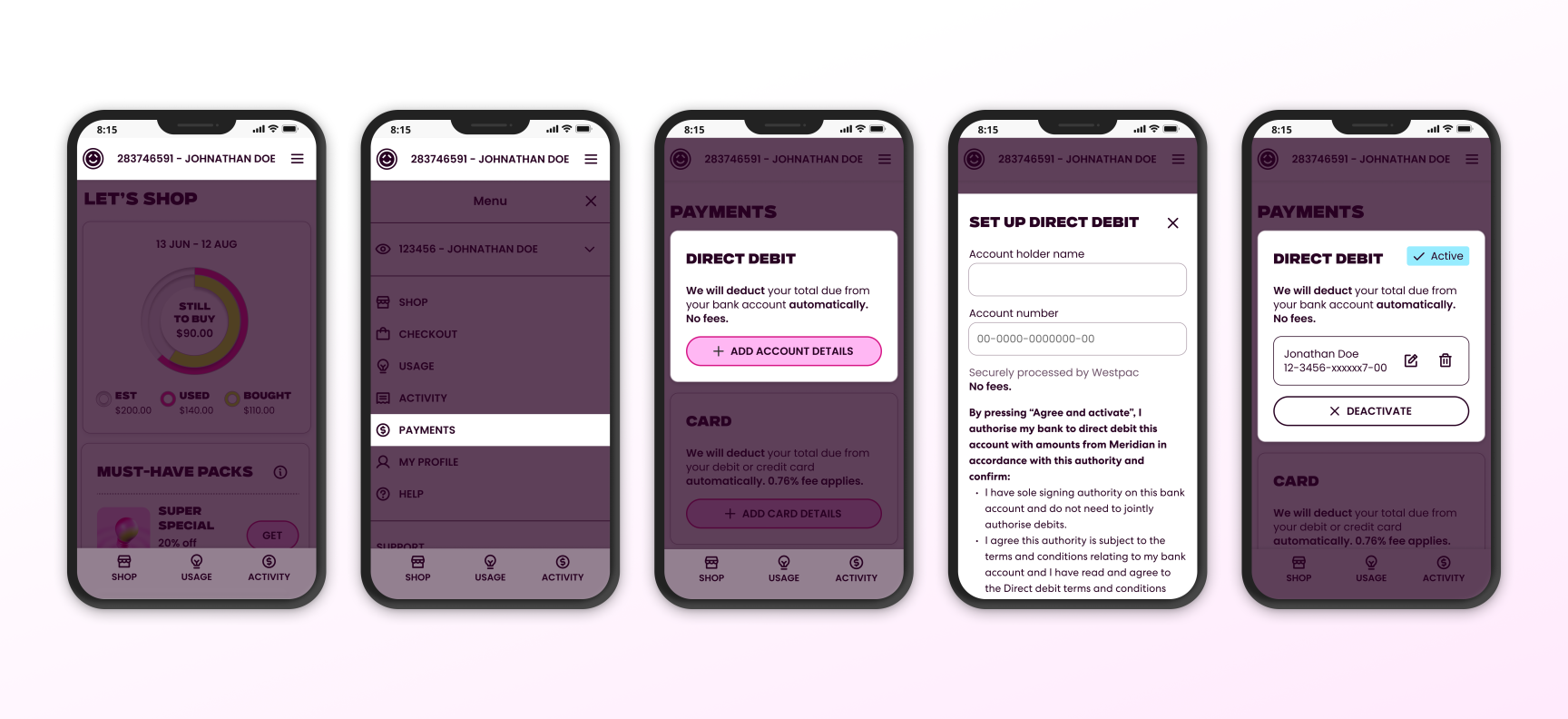
- On mobile tap the menu icon (three horizontal lines) in the top corner of the screen to open the navigation menu.
- Select Payments in the navigation menu. On desktop or tablets the Payments link is located on the left side of the screen.
- Next, tap the ’Add account details’ button.
- Enter your direct debit details and submit.
- Your direct debit payment method is now set up!
To add a debit or credit card
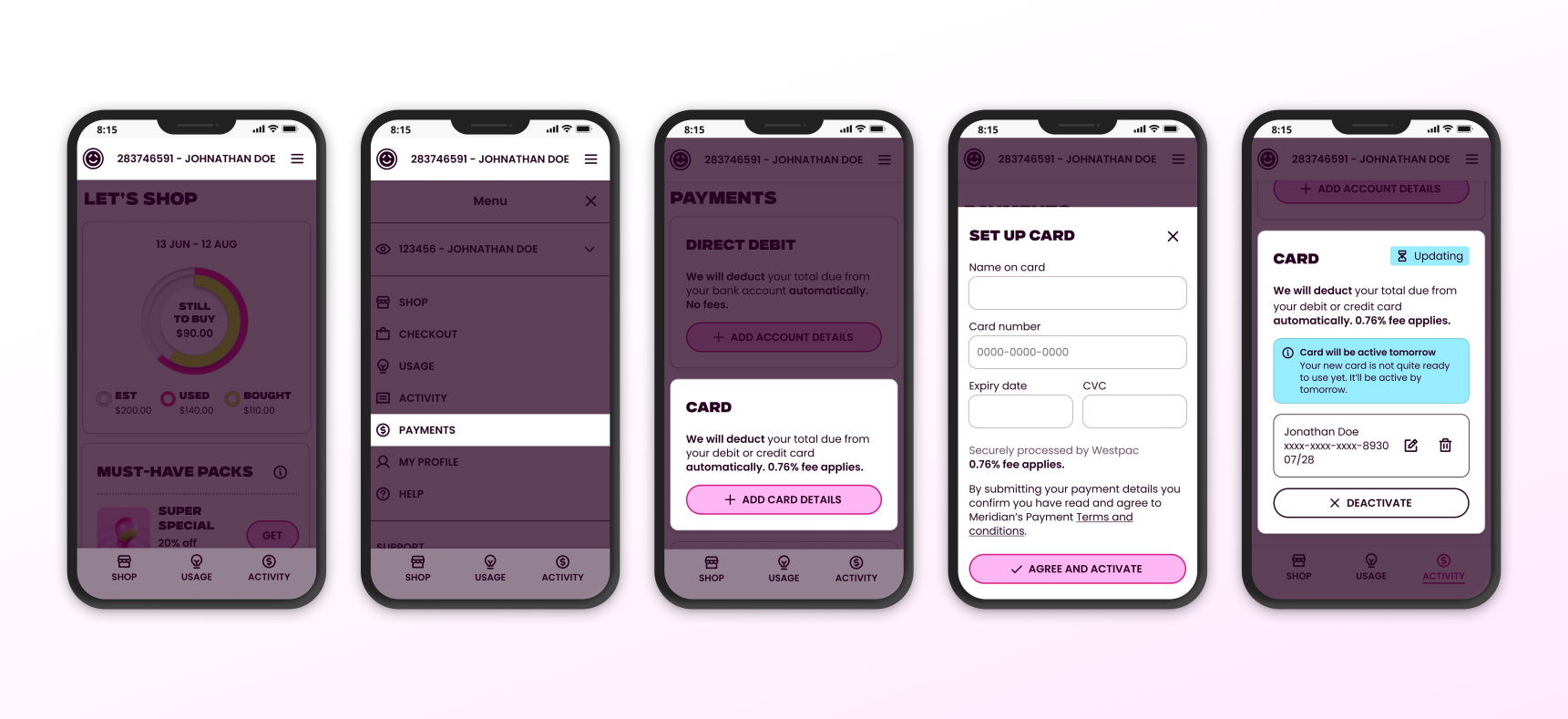
- On mobile tap the menu icon (three horizontal lines) in the top corner of the screen to open the navigation menu.
- Select Payments in the navigation menu. On desktop or tablets the Payments link is located on the left side of the screen.
- Next, tap the ’Add card details’ button. Note: Credit/debit card payments incur a 0.76% card fee.
- Enter your payment details and submit.
- Your payment method is now set up! Note it can take a day or two to update and be ready to use.
If you’d like to change to paying by bank transfer, use the details below or ask your bank to set up automatic or one-off payments.
To pay by bank transfer
Log in to your internet banking and follow your bank’s bill payment process the same way you usually do.
Note: Your account number will now start with "A-", so when you get a chance make sure you update your payment reference to your new account number. This will mean we can match your payments much faster. But no stress if you don't – we'll still match up your payments, it may just take a few extra days to work our magic.
How do I pay for Powerpacks?
How do I pay for Powerpacks?
When you confirm that you want to buy a Powerpack in the Shop, the default option will be to complete the transaction using your preferred payment method. You can nominate either a direct debit, debit card or credit card as your default payment method. Please note a 0.76% processing fee applies for credit card and debit card transactions.
Can I move my payment date?
Can I move my payment date?
Yup! If a scheduled payment date (a payment on your account scheduled by Powershop) doesn’t suit, you can change the payment date. You can do this by logging in to your online account and going to the ‘Transactions’ tab. Then click on ‘Move payment date’ and follow the instructions. This button will only appear when a payment has been scheduled. There is a limit to how far you can move it.
How do I know what my Account Review period is?
How do I know what my Account Review period is?
Mobile app: The dates shown above the circles on your home screen or 'power organiser' show your account review period. If you’re using the app and you have an account balance to pay, you’ll receive a push notification a few days after the end of your Account Review period.
Desktop: You can check your Account Review period by jumping on our app or logging into your desktop account. The start date is circled in your Power Organiser (the calendar on the right of your ‘Balance’ page).
When will I be billed for power?
When will I be billed for power?
You can check when your Account Review period is by using the app or logging in to your desktop account. The circles will tell you when your Account Review period is. If you log in via desktop, the start date is circled in your Power Organiser (the calendar on the right on your ‘Balance’ page).
If you’ve downloaded the app and linked your account, you’ll receive a push notification to let you know if you have a balance owing on your account. You’ll get this notification a few days after your Account Review period ends.
We recommend downloading our free app so that you get these notifications on your phone.
How do I know when my account review period is/ when will I be billed?
How do I know when my account review period is/ when will I be billed?
The dates shown above the circles on your home screen or 'power organiser' show your account review period.
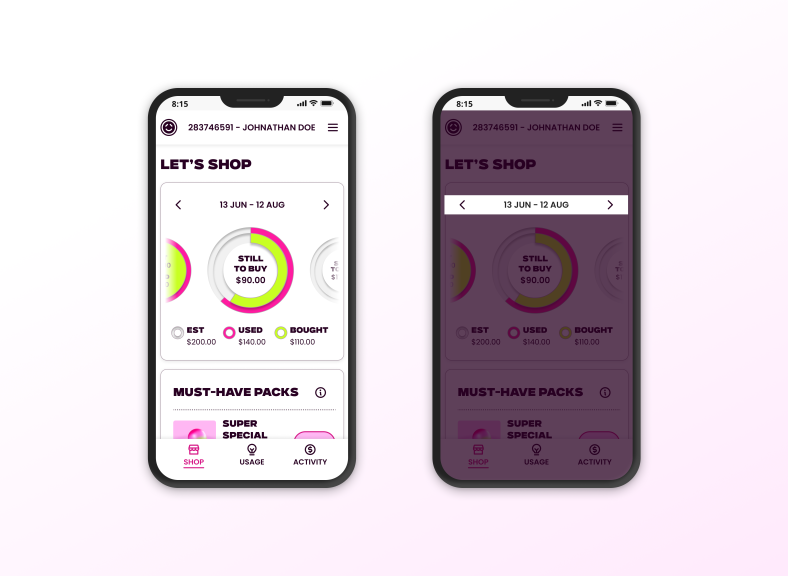
Note: If you’ve downloaded the app and linked your account, you’ll receive a push notification to let you know if you have a balance owing on your account. Once enabled, you’ll get this notification a few days after your Account Review period ends.
As of Feb 2026 push notifications aren't currently available but watch this space!
What happens at the end of my account review?
What happens at the end of my account review?
A couple of days after your Account Review period ends, we’ll email you if you haven’t bought enough Powerpacks to cover your usage and charges, or if your meter reads aren’t up-to-date.
What to do if your meter reads aren’t up-to-date
You can either:
- Enter a read by logging in to your desktop account or on our mobile app. More on entering a meter read. Bear in mind that if the meter reading you enter is higher than we’ve estimated, you may need to buy more power.
- Hold tight, and we’ll base your Account Review on an estimated reading. If we do this, we’ll update your account next time we receive an actual read
What if I haven’t bought enough Powerpacks at the end of my Account Review period?
What if I haven’t bought enough Powerpacks at the end of my Account Review period?
If you haven't bought enough Powerpacks to cover you for your current Account Review period – don’t panic, we are not going to cut off your supply. We’ll buy your default Powerpack for you, to cover your power used. For most customers, this will be equal to the power you have used at your Standard Rate.
To get the most savings we recommend buying all the Staying Power and Special Powerpacks, 2x Future Packs six months in advance and then Value Powerpacks to cover extra usage.
We’ll always give you at least three days' notice before we debit any money from your preferred payment method. If paying on this date is not convenient, you can also move your payment date, read how.
Download our mobile app and you’ll also get a mobile alert at least three days before we make a transaction. We’ll let you know how much we’re going to take, and when.
What are my options for paying later?
What are my options for paying later?
We’re really flexible when it comes to payments. We let you choose when, where and how you pay for your power within your billing period.
Buy now, pay later explained
With our 'Pay later' option you can buy Powerpacks without having to make an immediate payment. This means you can grab limited time Specials as they are released and choose to either pay for them right away, at the end of your billing cycle or any day in between. This means that if you prefer to only pay for your power once a month you can still get access to the great specials in the Shop.
Using ‘Pay later’ is a great option for those customers who pay manually using online banking or if you would like to have a single monthly manual or auto payment at the end of your billing cycle. If you go the auto payment route, we’ll debit your default payment method for the outstanding balance owing at the end of your billing cycle (Account Review period).
Set and forget payment options
You can nominate either a direct debit or credit card as your preferred payment method. Note that a 0.76% processing fee applies for credit card and debit card transactions. We’ll then use this payment method when an auto-payment is created on your account. For example, when you buy a Powerpack. We’ll also use this method of payment when you have an outstanding balance at the end of your billing cycle (Account Review period).
If you're struggling to pay your bill, or think you might soon, let us know. We're here to help.
-

need to refund a powerpack?
No worries - If you change your mind about buying a Powerpack you can refund the purchase yourself in the app within 48 hours of the original purchase. Outside of 48 hours and for customers that have been migrated to our new platform, you will need to give us a call instead.
Read more -

struggling with your bills? we can help
If you’re struggling to pay your electricity bills or think you will soon, we’re here to help keep the lights on whatever your situation. Together we’ll suss a payment plan that works for you and look at options to help.
Read more